
Proxiserve
A data mapping and import tool designed to make a complex technical process accessible to non-technical business users.
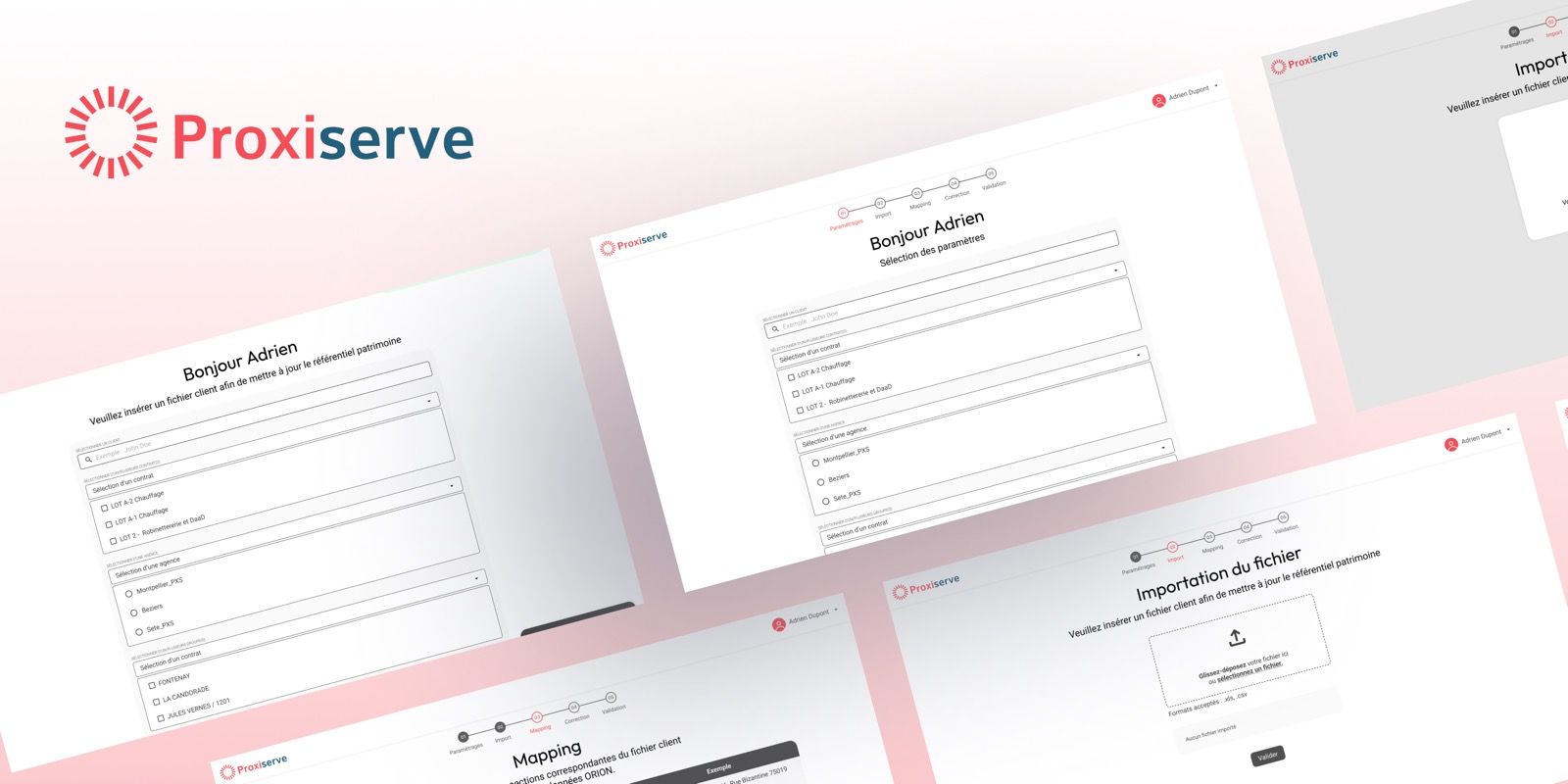
Overview
My role
UI Designer
- Engagement
- Competitive tender
Team
- Product Owner
- Lead Dev
Details
- Sector
- Heating system maintenance
- Date
- January 2025
- Duration
- 1 week
My contribution
- Production of the wireframes and all UI mockups
- Design of the five-screen import flow: parameters, import, mapping, anomaly correction, summary, completed by toast notifications
- Delivered in one week
Context
Proxiserve specializes in heating maintenance. To run its activity, the company relies on a property reference base that gathers its client information: properties, contact persons and contact details, linked to contracts, agencies and groups of buildings.
This information used to be scattered across several Excel files. The ORION database already existed, but Proxiserve wanted to update it more effectively and make its information reliable. The company issued a call for tenders to design the tool that would feed it: the mapping of the information had to be rethought from scratch, by creating the screens presented below. The scope covered a guided journey allowing teams to import a client file, match its columns to the structure of ORION, detect and correct anomalies, then validate the sending to the database.
Our agency answered the call for tenders and won it.
Challenge and problem
A reference database to update, with no tool to do it.
Client: Proxiserve, a company specialising in heating system maintenance.
Problem: internal teams had to manually update a large client address database using heterogeneous Excel files, with no dedicated tool.
Response: design of a structured, guided and reliable data mapping and import tool, in the context of a competitive tender.
Making complexity readable and actionable
Making a complex technical process (import, column mapping, anomaly detection and correction, validation) readable and actionable for non-technical business users, without prior training.
Inputs and assumptions
Inputs
The starting point was Proxiserve’s call for tenders, completed by a team brief. The tool had to be designed and delivered in one week. I produced the wireframes, the mockups and the groundwork of the project, with a product owner handling the technical link with the developers.
Four inputs shaped the project:
- Users: Proxiserve agencies and property portfolio managers, who update the reference base.
- Files: client files in Excel or CSV format, whose structure varies from one client to another.
- Target base: ORION, already in place, which organizes data by client, contract, agency, group, property and contact.
- Business rules: checks on emails and phone numbers (10 characters, and a 06 or 07 prefix for a mobile number), and a contact matching logic based on the property reference, which decides whether a contact person is updated, archived or created.
Design assumptions
Without access to users or to the client during the design phase, our choices relied on five assumptions:
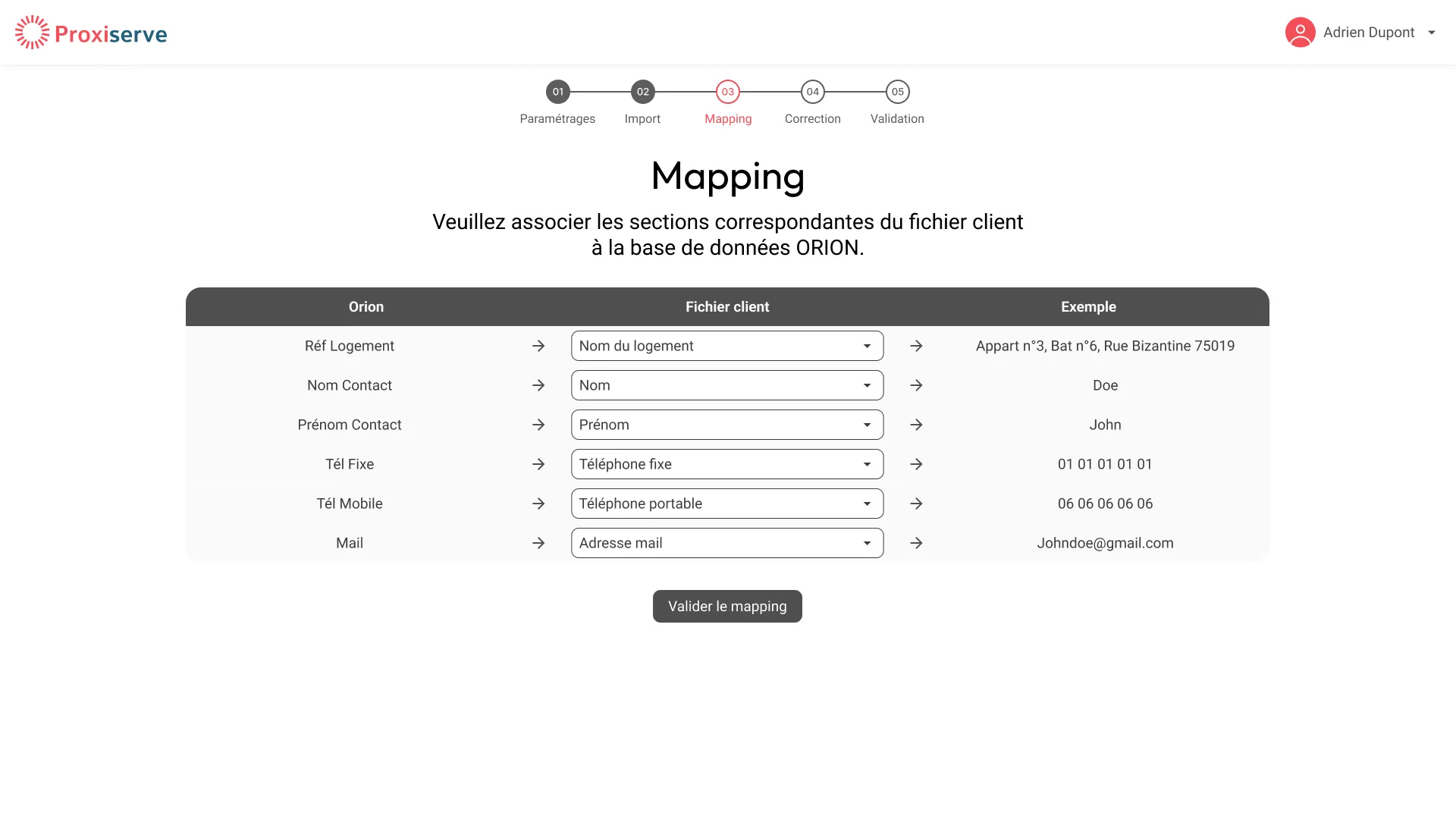
- Client files do not all share the same structure, so the mapping is explicit, with an example value for each column.
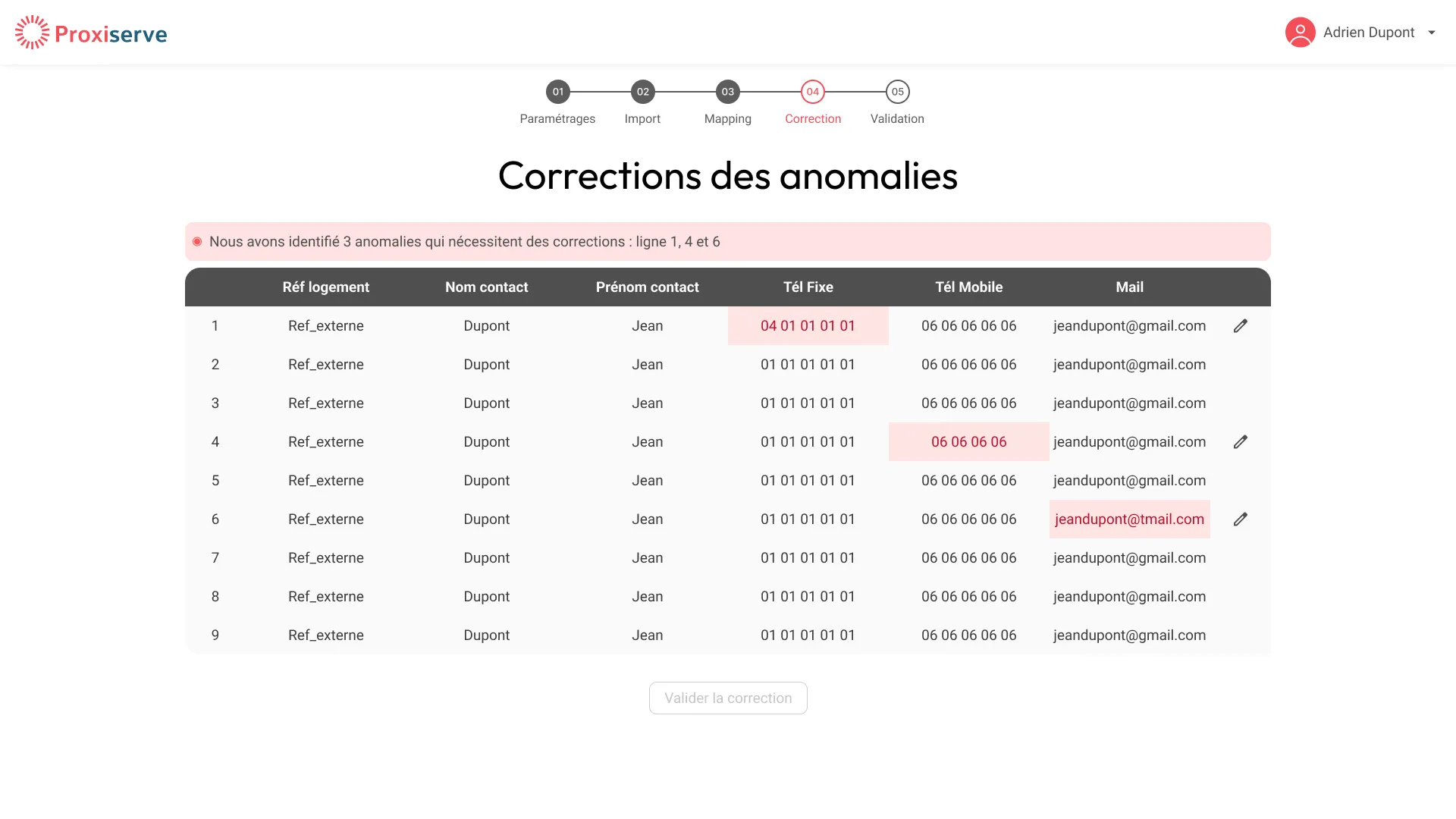
- Input data contains entry errors, so corrections happen before sending, directly on the affected row.
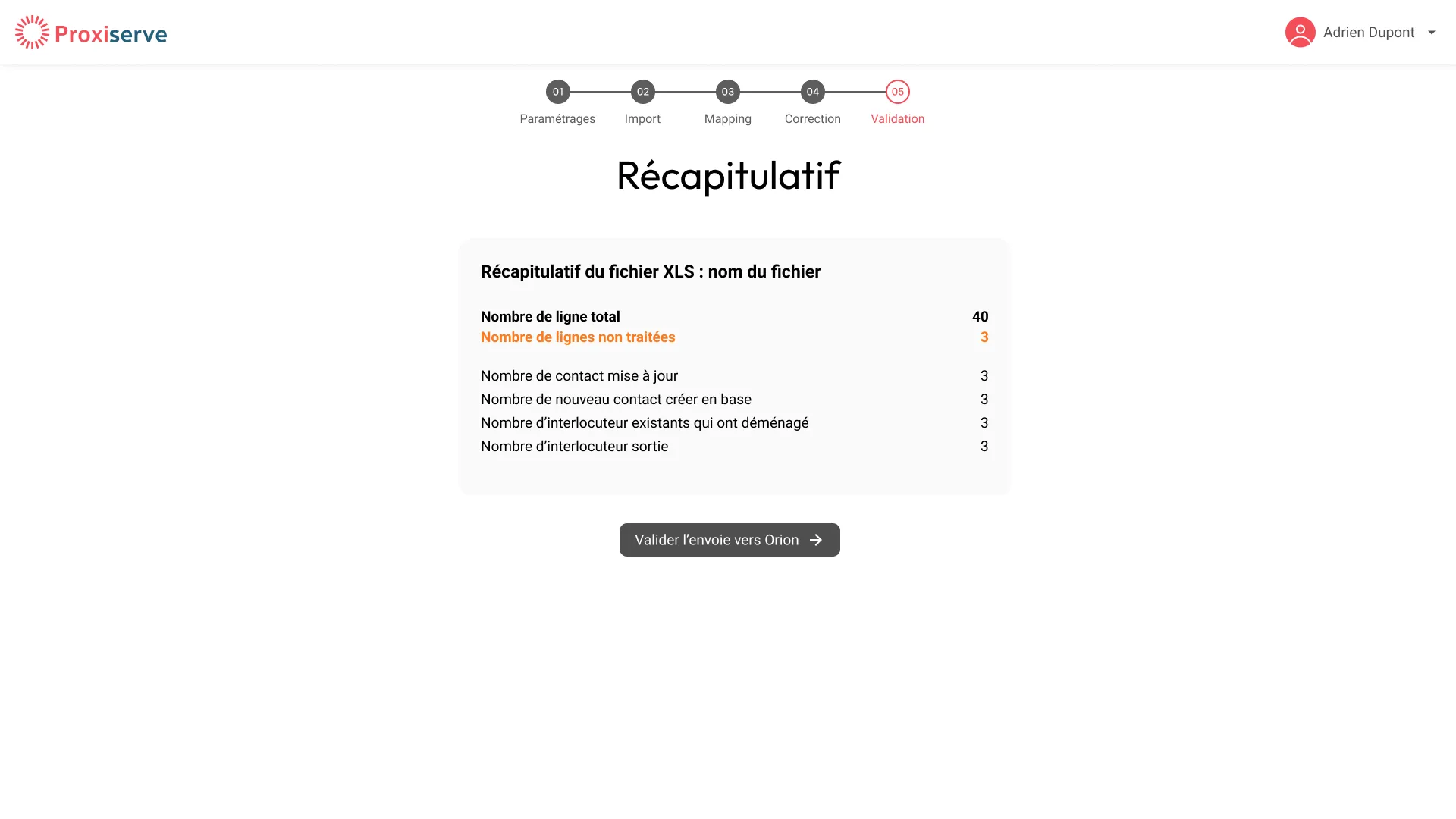
- An update affects a shared base, so a numbered summary precedes the sending to ORION.
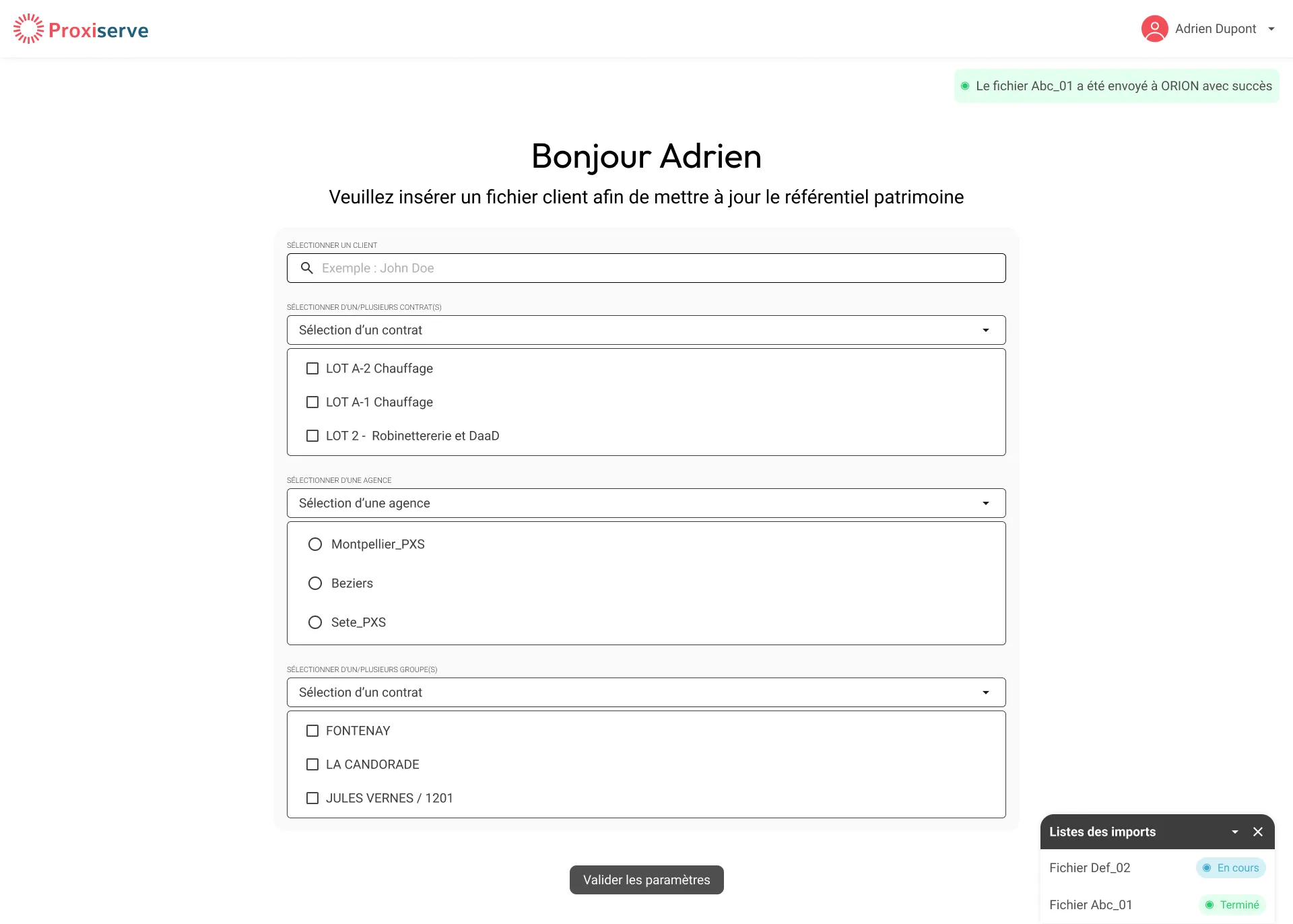
- An import takes time, so users must be able to keep working during processing, thanks to a tracking panel.
- Users do not need to know the structure of ORION, so the interface speaks their business language.
These assumptions were not tested with users before delivery, as the timeframe did not allow it.
User journey
Before the interface was designed, the team framed the end to end journey of a user updating the property reference base. This framing defines the steps of the tool and the business rules behind it. My contribution starts with the UI design of these steps.
-
Step 1. I sign in
Page: Sign in
- Proxiserve agency user or property portfolio manager (chargé de patrimoine).
- Sign in without email or password.
-
Step 2. I update a property reference base
Page: Update
- I choose client, contracts, agency and groups.
- I upload the client's Excel or CSV file.
- The tool analyses the data.
-
Step 3. I map my file to the ORION database
Page: Mapping
- I match the file columns to ORION tables.
-
Step 4. The tool checks the data and displays the anomalies
Page: Anomalies
- Email and phone anomalies are shown.
- I correct them and validate.
Business rules
- Email: checked.
- Landline: 10 characters, must not start with 06 or 07.
- Mobile: 10 characters, must start with 06 or 07.
-
Step 5. The tool displays a summary
Page: Summary
- I see contacts updated, created, with a role change, leaving, and rows not processed.
- I can display the related rows.
- I validate.
Business rules
Matching is done by property reference:
- Name, mobile and email all match: no update.
- Mobile and email match: the contact is updated.
- Name and mobile match, or name and email match: the contact is updated.
- Otherwise: the existing contact person is archived with an end date of J minus 1 (J being the processing day), and a new contact person is created, as follows.
- If the contact already exists in the database (searched on mobile and email): a contact person is created on the property with the contact found. Occupant is true, main is true, entry date is J.
- If the contact does not exist: a new contact is created with the data entered by the technician, then a contact person is created on the property with this new contact. Occupant is true, main is true, entry date is J.
-
Step 6. The tool confirms the data was sent to ORION and returns me home
System feedback
- The tool emails me once the data is loaded into ORION.
The five steps of the interface stepper correspond to steps 2 to 5 of this journey, the update step being split into settings and import.
Key design choices
Proxiserve teams update the ORION reference base from heterogeneous client files. Our approach: a restrained interface that asks for one decision at a time, so that the update can be done without errors.
A guided journey in five steps
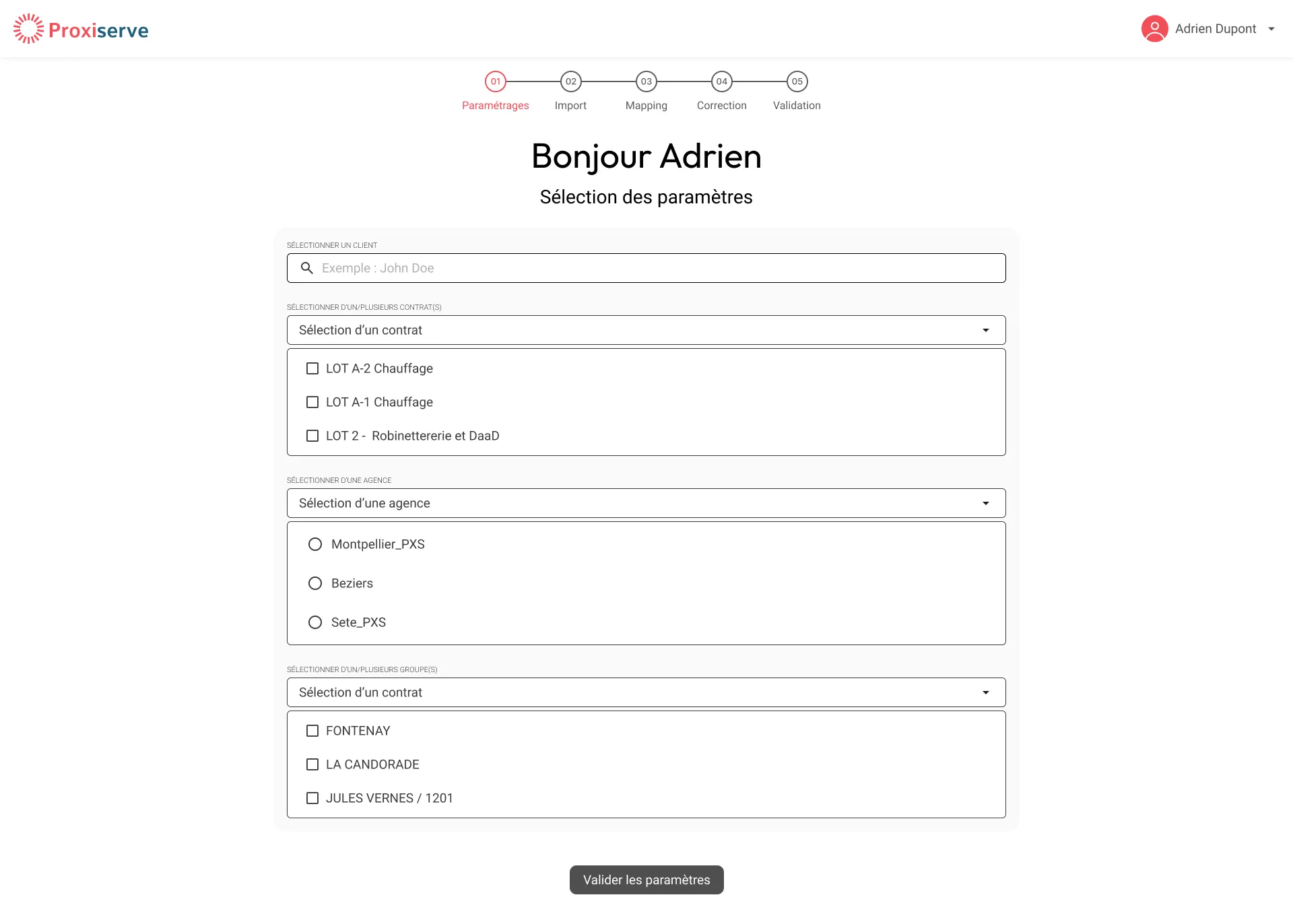
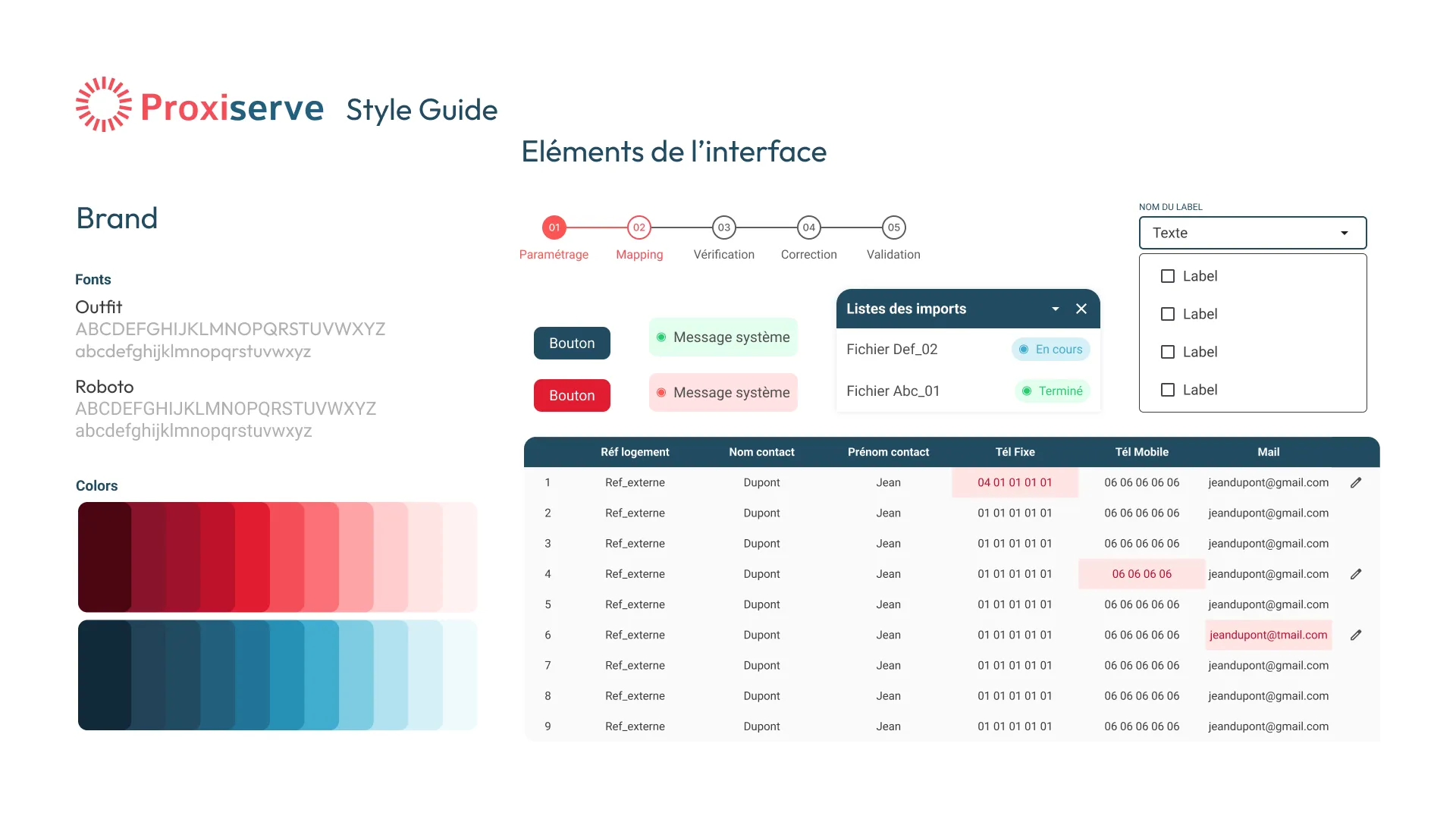
A permanent stepper shows progress, and each screen carries a single task. The controls reflect the business rules: checkboxes for multiple selections, radio buttons for a single choice.
Errors prevented before being corrected
At the mapping step, each column comes with an example value so users can check the match against real data. At the correction step, only the cells in error are highlighted and can be edited directly on the row. A numbered summary precedes the sending to ORION.
Feedback adapted to the context
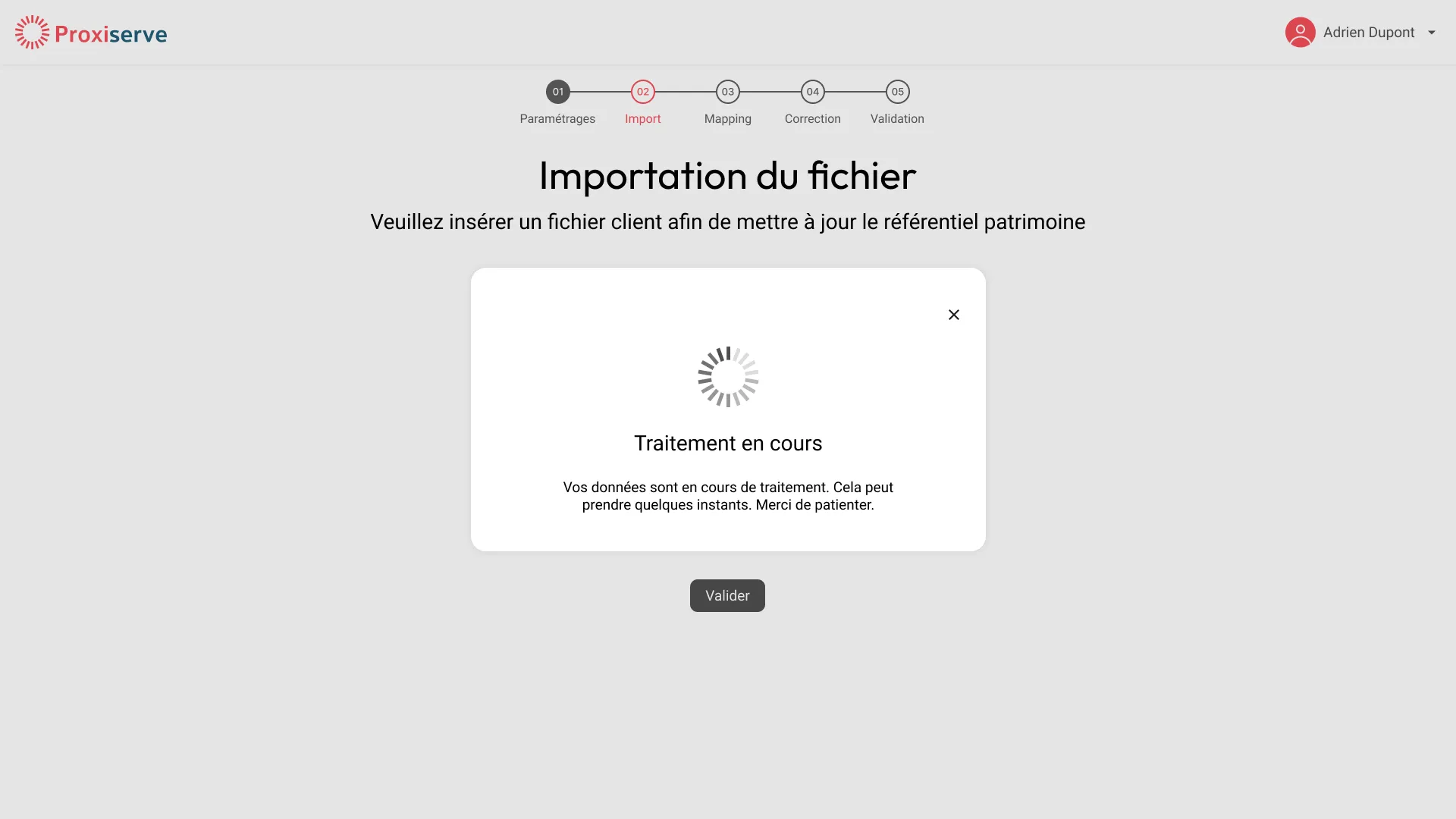
While the file is being processed, a modal cannot be closed, because what follows depends on its result. After that, the user is no longer blocked: an animated toast announces the success or the failure of the import, then disappears on its own. A persistent tracking panel keeps the status of every import and lets users start a new one without losing track of the previous one.
Flows, wireframes and prototypes
A five-screen flow, guided and frictionless.
Step 1, parameters
Client, contract, agency and group selection before import.
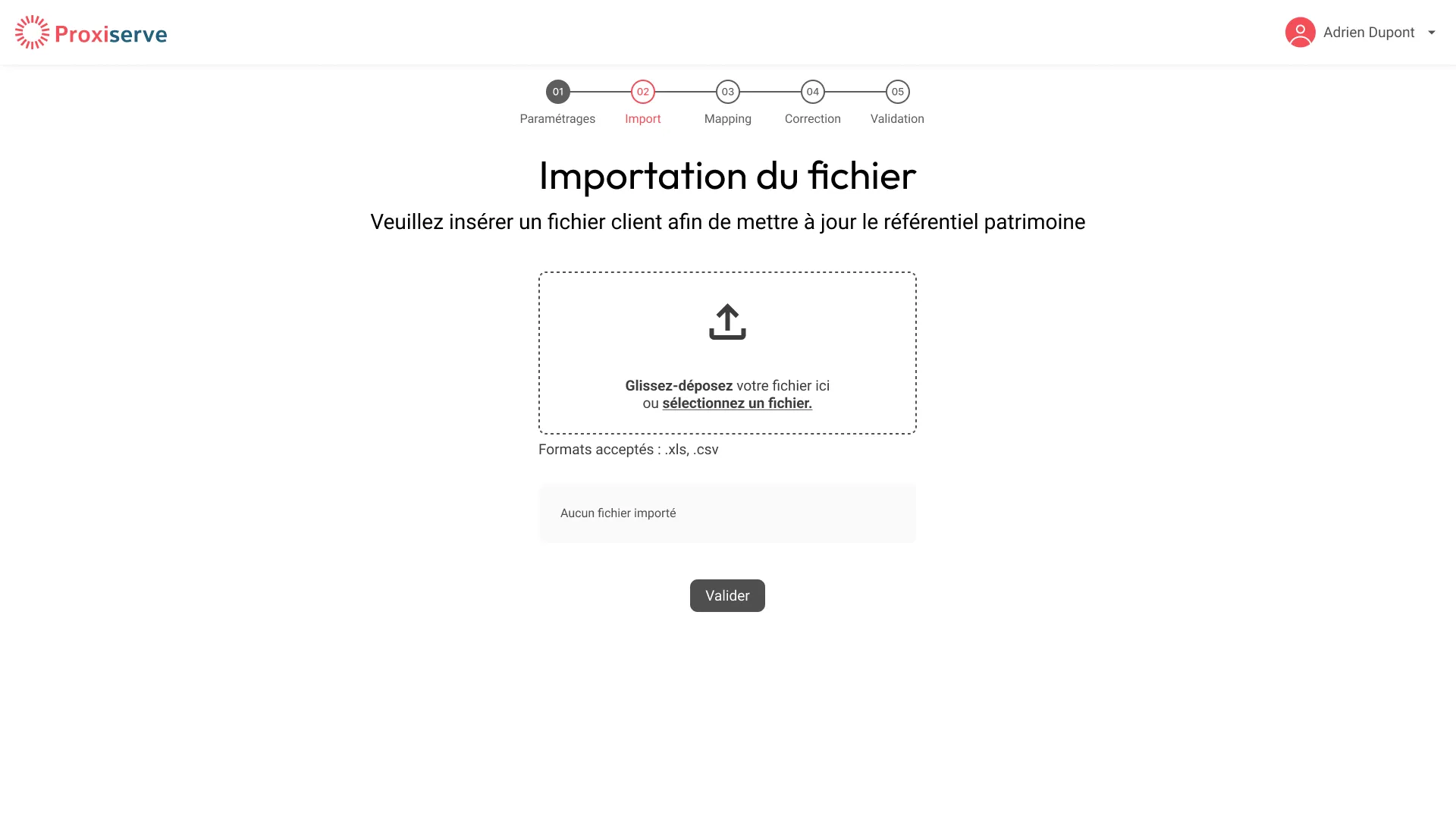
Step 2, file import
Drag-and-drop zone with explicit accepted formats (.xls, .csv).
Step 3, column mapping
Visual association between the client file and the ORION database.
Step 4, anomaly correction
Inline highlighting of problematic cells with direct row editing.
Step 5, summary
Overview of operations before final validation to ORION.
Success notification
System confirmation allowing a new cycle to launch immediately.
Style guide
Results and learnings
Tender won. Tool in production.
Tender won. Tool delivered in production, used by Proxiserve’s internal teams to update the property reference database.
Translating a technical operation into business language
Column mapping and anomaly correction are technical operations. Making them usable without training taught me to name each step in the user’s own words and to show a concrete example at every decision, like the column of examples on the Mapping screen.